
Object-oriented programming (OOP) is where a lot of Python courses shift gears entirely — instead of writing scripts that run top to bottom, you’re suddenly designing blueprints (classes) that get stamped out into many individual objects, each with their own data and behavior. The vocabulary alone (self, __init__, inheritance, polymorphism, encapsulation) can feel like a wall, and it’s genuinely common for students who were comfortable with functions and loops to feel like they’re starting over. This guide breaks down every core OOP concept in Python with full worked examples, focusing especially on the two things that trip students up most: what self actually does, and how inheritance really works underneath the syntax.
Table of Contents
ToggleClasses and Objects: The Blueprint Analogy
A class is a blueprint; an object (or instance) is something built from that blueprint. You can create many different objects from the same class, each with its own independent data.
class Student:
    def __init__(self, name, major, gpa):
        self.name = name
        self.major = major
        self.gpa = gpa

    def describe(self):
        return f"{self.name} is studying {self.major} with a GPA of {self.gpa}."

# Creating two separate objects from the same class
student1 = Student("Amara", "Biology", 3.7)
student2 = Student("Ravi", "Computer Science", 3.9)

print(student1.describe())  # Amara is studying Biology with a GPA of 3.7.
print(student2.describe())  # Ravi is studying Computer Science with a GPA of 3.9.
Common assignment mistake: Confusing the class itself with an object created from it. Student is the blueprint; student1 and student2 are two independent objects, each with their own name, major, and gpa values stored separately — changing student1.gpa has no effect whatsoever on student2.gpa, since they’re entirely separate pieces of data in memory.
Understanding self: The Concept That Confuses Almost Everyone at First
self is easily the single most confusing part of early OOP in Python, mostly because it’s invisible at the point where you’d expect to see it.
class Counter:
    def __init__(self, start=0):
        self.count = start

    def increment(self):
        self.count += 1

c = Counter()
c.increment()       # Python automatically passes c as self
print(c.count)      # 1
What’s actually happening: When you call c.increment(), Python automatically passes c itself as the first argument to increment() — this is exactly what self refers to inside the method. You never explicitly pass it yourself when calling the method; Python inserts it for you behind the scenes. But it does need to be explicitly listed as the first parameter in the method’s own definition — this asymmetry (implicit when calling, explicit when defining) is exactly what confuses students.
Worked example making this explicit (showing what Python does internally):
# These two lines are functionally equivalent:
c.increment()
Counter.increment(c)  # calling it "manually" the way Python does internally
Common assignment mistake: Forgetting to include self as the first parameter in a method definition, which produces a TypeError claiming the method takes a certain number of arguments but a different number were given — this error message is confusing precisely because the discrepancy is exactly one argument (the implicitly passed self), which is easy to miss if you’re not looking for it specifically.
The __init__ Method: Setting Up a New Object
__init__ runs automatically every time a new object is created from a class, and its job is to set up that object’s initial attributes.
class BankAccount:
    def __init__(self, owner, balance=0):
        self.owner = owner
        self.balance = balance

    def deposit(self, amount):
        self.balance += amount
        return self.balance

    def withdraw(self, amount):
        if amount > self.balance:
            return "Insufficient funds"
        self.balance -= amount
        return self.balance

account = BankAccount("Jordan", 100)
account.deposit(50)
print(account.balance)          # 150
print(account.withdraw(500))    # Insufficient funds
Common assignment mistake: Confusing __init__ with a constructor “call” the way some other languages name it directly — in Python, you never call __init__ yourself; you call the class name as if it were a function (BankAccount("Jordan", 100)), and Python runs __init__ automatically as part of building that new object.
Instance Attributes vs. Class Attributes
This distinction is a frequent source of subtle, hard-to-spot assignment bugs.
class Course:
    department = "Computer Science"  # class attribute — shared by ALL instances

    def __init__(self, course_name):
        self.course_name = course_name  # instance attribute — unique per object

cs101 = Course("Intro to Programming")
cs202 = Course("Data Structures")

print(cs101.department)  # Computer Science
print(cs202.department)  # Computer Science

Course.department = "Software Engineering"  # changes it for ALL instances
print(cs101.department)  # Software Engineering
print(cs202.department)  # Software Engineering
What’s happening: department is defined directly inside the class body (not inside __init__, and not attached to self), which makes it a class attribute — a single, shared value stored on the class itself, not duplicated for each object. course_name, defined inside __init__ using self.course_name, is an instance attribute — a separate value stored individually on each object.
A trap worth knowing for assignments (mutable class attributes):
class Team:
    members = []  # DANGEROUS: mutable class attribute

    def add_member(self, name):
        self.members.append(name)

team_a = Team()
team_b = Team()
team_a.add_member("Sam")
print(team_b.members)  # ['Sam']  <- unexpected! Shared across both objects.
This is the class-based cousin of the mutable default argument trap covered in Python Functions Explained — since members is a class attribute (shared), appending to it through one instance affects every instance. The fix is to make it an instance attribute instead, initialized fresh inside __init__:
class Team:
    def __init__(self):
        self.members = []  # now unique to each object

    def add_member(self, name):
        self.members.append(name)
Inheritance: Building Specialized Classes From a General One
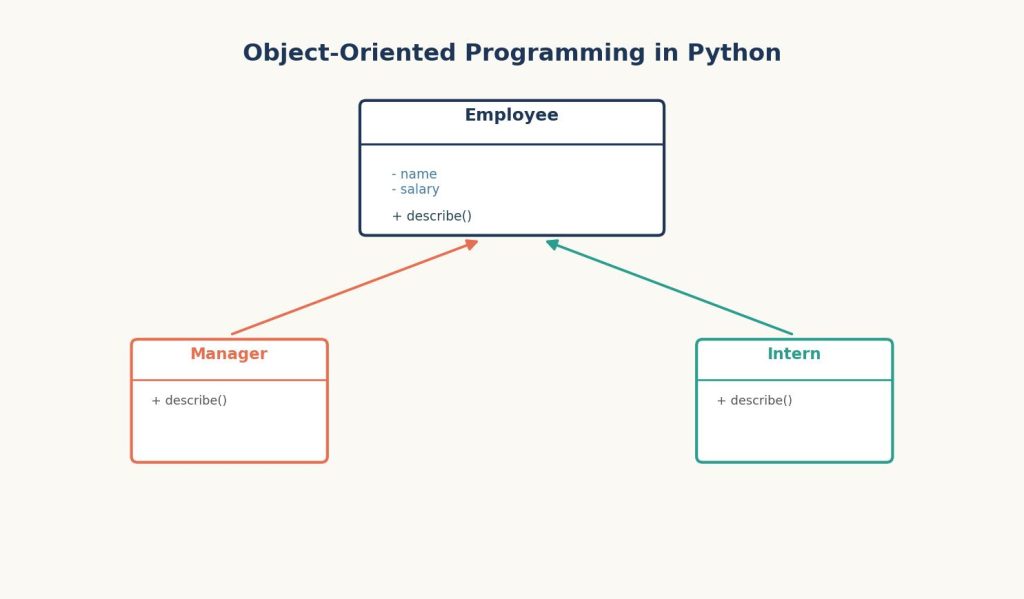
Inheritance lets a new class (a subclass or child class) reuse and extend the behavior of an existing class (a superclass or parent class), without rewriting shared code.
class Employee:
    def __init__(self, name, salary):
        self.name = name
        self.salary = salary

    def describe(self):
        return f"{self.name} earns ${self.salary}."

class Manager(Employee):
    def __init__(self, name, salary, team_size):
        super().__init__(name, salary)   # calls Employee's __init__
        self.team_size = team_size

    def describe(self):
        base_description = super().describe()  # reuses Employee's describe()
        return f"{base_description} They manage a team of {self.team_size}."

emp = Employee("Tomás", 55000)
mgr = Manager("Priya", 85000, 6)

print(emp.describe())  # Tomás earns $55000.
print(mgr.describe())  # Priya earns $85000. They manage a team of 6.
What super() actually does: it gives you access to the parent class’s methods from inside the child class, without hardcoding the parent class’s name directly. This is especially useful in __init__, where it lets Manager reuse Employee‘s setup logic for name and salary, instead of duplicating those two lines.
Common assignment mistake: Forgetting to call super().__init__(...) inside a subclass’s own __init__, which means the parent class’s attributes (like name and salary here) never actually get set on the child object — leading to an AttributeError the first time the code tries to access self.name on a Manager object.
Method Overriding and Polymorphism
Overriding happens when a subclass defines a method with the same name as one in its parent class, replacing (or extending, via super()) that behavior — exactly what Manager.describe() did above. Polymorphism is the broader principle that different classes can be used interchangeably through a shared method name, even though each class’s actual behavior differs.
Worked example demonstrating polymorphism directly:
class Dog:
    def speak(self):
        return "Woof!"

class Cat:
    def speak(self):
        return "Meow!"

class Duck:
    def speak(self):
        return "Quack!"

animals = [Dog(), Cat(), Duck()]

for animal in animals:
    print(animal.speak())
Output:
Woof!
Meow!
Quack!
What’s happening: The loop calls animal.speak() identically for every object, without needing to know or check what specific type of animal it is — each object responds with its own version of speak(). This is polymorphism: the same method call produces different, type-appropriate behavior depending on the actual object involved. This pattern connects directly to the iteration concepts in Python Loops, List Comprehensions, and Iterators, since polymorphism is most useful precisely when looping over a mixed collection of related objects.
Encapsulation: Protecting an Object’s Internal Data
Python doesn’t enforce strict private access the way some other languages do, but it uses naming conventions to signal intent.
class BankAccount:
    def __init__(self, owner, balance):
        self.owner = owner
        self._balance = balance  # single underscore: "internal use" convention

    def get_balance(self):
        return self._balance

    def deposit(self, amount):
        if amount <= 0:
            raise ValueError("Deposit amount must be positive")
        self._balance += amount
A single leading underscore (_balance) is a widely followed convention signaling “this is intended for internal use — don’t access it directly from outside the class,” though Python doesn’t technically prevent you from doing so. A double leading underscore (__balance) triggers Python’s name mangling, making the attribute genuinely harder (though still not impossible) to access accidentally from outside the class — this is closer to true “private” behavior, and is worth using specifically when an assignment calls for stricter encapsulation.
Common assignment mistake: Assuming a single underscore prevents outside access the way private does in other languages — it doesn’t; it’s purely a convention, and Python will happily let you write account._balance = -500 directly if you choose to, bypassing any validation logic in deposit(). Assignments that specifically test encapsulation understanding often ask you to explain this distinction, not just apply the underscore syntax.
A Full Worked Example: Combining Everything
class Shape:
    def __init__(self, name):
        self.name = name

    def area(self):
        raise NotImplementedError("Subclasses must implement area()")

    def describe(self):
        return f"{self.name} has an area of {self.area():.2f}"

class Rectangle(Shape):
    def __init__(self, width, height):
        super().__init__("Rectangle")
        self.width = width
        self.height = height

    def area(self):
        return self.width * self.height

class Circle(Shape):
    def __init__(self, radius):
        super().__init__("Circle")
        self.radius = radius

    def area(self):
        return 3.14159 * self.radius ** 2

shapes = [Rectangle(4, 5), Circle(3), Rectangle(2, 8)]

for shape in shapes:
    print(shape.describe())
Output:
Rectangle has an area of 20.00
Circle has an area of 28.27
Rectangle has an area of 16.00
What this example demonstrates: Shape defines a shared structure (describe()) and an intentionally incomplete method (area(), which raises an error if not overridden) — a pattern that forces every subclass to provide its own area() implementation. This combines inheritance (Rectangle and Circle both extend Shape), method overriding (area() is defined differently in each subclass), and polymorphism (the loop calls describe() identically on every object, regardless of its specific shape).
If you’re applying these OOP concepts to a larger university project, the challenge is often less about understanding individual concepts and more about putting classes, inheritance, methods, and object relationships together correctly. Students working on a substantial Python programming assignment may find it useful to break the project into smaller class-design and implementation problems before attempting the complete solution.
A Step-by-Step Checklist for Students Stuck on an OOP Assignment
- Remember
selfrefers to “the specific object this method was called on” — Python passes it automatically when you call a method with dot notation, but you must still list it explicitly as the first parameter in every method’s definition. - Distinguish class attributes (defined directly in the class body, shared across all objects) from instance attributes (defined with
self.inside__init__, unique per object) — and avoid mutable class attributes unless you specifically intend to share that data. - When writing a subclass, call
super().__init__(...)if you need the parent class’s setup logic, and usesuper().method_name()to reuse (rather than fully replace) a parent method’s behavior. - Test polymorphism by looping over a list of different object types and calling the same method name on each — if each object responds with its own appropriate behavior, polymorphism is working correctly.
- Use a single underscore prefix as a convention signaling “internal use only,” and remember it’s not true access control — Python still allows direct access if the calling code chooses to.
FAQs
Q1: Why do I have to write self in every method definition if Python passes it automatically? Python requires self to be explicitly listed as the first parameter in a method’s definition so the method has a way to refer to the specific object it’s operating on — the automatic part is only that Python fills in that first argument for you when you call the method using dot notation (object.method()); the definition itself must still declare that parameter.
Q2: What’s the actual difference between a class attribute and an instance attribute? A class attribute is defined directly in the class body and is shared by every object created from that class — changing it affects all instances at once. An instance attribute is defined inside __init__ using self.attribute_name, and each object gets its own independent copy, so changing one object’s instance attribute has no effect on any other object.
Q3: Do I always need to call super().init() in a subclass? Only if you want the subclass to inherit and run the parent class’s setup logic (typically to initialize attributes the parent class defines). If you skip it, those parent-class attributes won’t be set on the child object, which usually causes an AttributeError the first time your code tries to use them.
Q4: What’s the difference between method overriding and polymorphism? Overriding is the specific act of redefining a method in a subclass that already exists (with the same name) in the parent class. Polymorphism is the broader outcome this enables: code that calls the same method name on different object types, without needing to know each object’s specific class, and gets appropriately different behavior back from each one.
Q5: Why doesn’t Python have truly private attributes like some other languages? Python’s design philosophy generally favors trusting developers with access rather than strictly enforcing it, summarized in the community principle “we’re all consenting adults here.” Single and double underscore prefixes signal increasing levels of “this is internal, please don’t touch it directly,” but Python deliberately stops short of making internal attributes completely inaccessible from outside the class.
Related Reading Woven Into This Guide
The self parameter and method structure covered here build directly on the parameter and argument concepts introduced in Python Functions Explained: Parameters, *args, **kwargs, and Return Values — a method is really just a function defined inside a class, with self as an automatically supplied first argument. If your class methods produce unexpected errors like AttributeError or TypeError, the systematic troubleshooting approach in Debugging Python Code: Common Errors, Exceptions, and How to Fix Them will help you trace exactly where the object’s state diverged from what your code expected.