
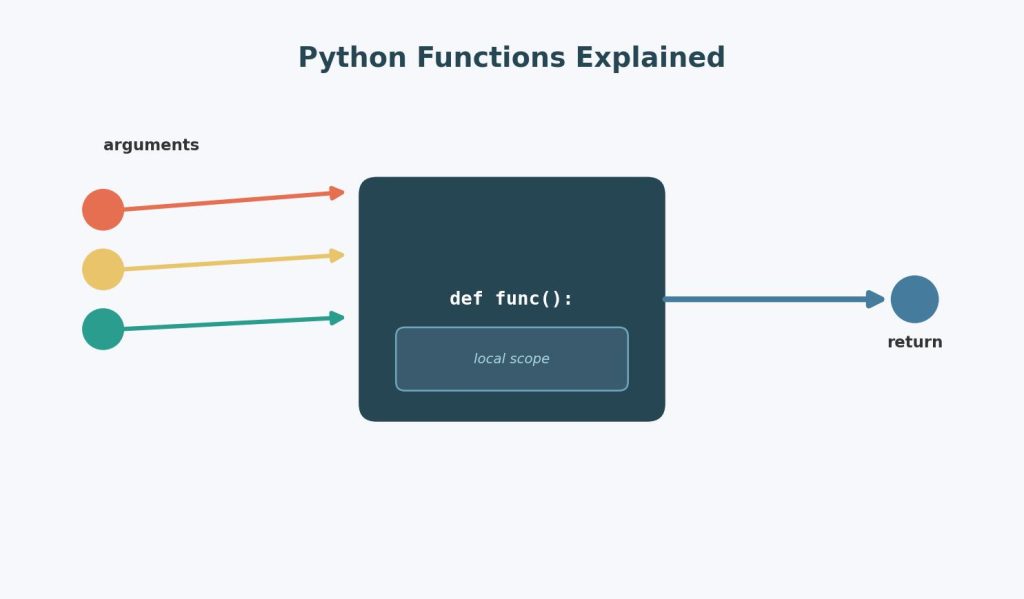
Functions are usually introduced early in a Python course as “reusable blocks of code,” which makes them sound simple — and the basic syntax is. What actually derails students is everything that shows up a few weeks later: the difference between positional and keyword arguments, what *args and **kwargs actually do, why a variable defined inside a function disappears the moment the function ends, and why return and print are not interchangeable, despite often looking like they produce the same output. This guide works through all of it, in the order these confusions tend to appear, with fully worked examples at every step.
Table of Contents
ToggleThe Absolute Basics: Defining and Calling a Function
def greet(name):
    return f"Hello, {name}!"

message = greet("Amara")
print(message)  # Hello, Amara!
Three parts matter here: the def keyword starts the definition, name is a parameter (a placeholder the function expects), and "Amara" is the argument (the actual value supplied when the function is called). Students often use “parameter” and “argument” interchangeably in casual conversation, but assignments — especially ones asking you to explain your code — sometimes specifically test whether you know parameters belong to the function definition and arguments belong to the function call.
return vs. print: The Single Most Common Beginner Confusion
This is worth addressing before anything else, because it causes downstream bugs in almost every other topic in this guide.
def add_v1(a, b):
    print(a + b)

def add_v2(a, b):
    return a + b

result1 = add_v1(3, 4)   # prints 7, but result1 is None
result2 = add_v2(3, 4)   # prints nothing, but result2 is 7

print(result1)  # None
print(result2)  # 7
What’s actually happening: print() displays a value on the screen and hands nothing back to the code that called the function — the function’s actual return value defaults to None if there’s no explicit return statement. return sends a value back to wherever the function was called, so it can be stored in a variable, used in a calculation, or passed into another function.
Common assignment mistake: Writing a function that prints a calculated value, then trying to use that function’s output in a later calculation (total = add_v1(3, 4) + 10), which fails silently or throws a TypeError because add_v1(3, 4) actually evaluates to None, not 7. If your function’s result needs to be used anywhere else in your program, it must use return, not just print.
Positional vs. Keyword Arguments
def describe_student(name, age, major):
    return f"{name} is {age} years old, studying {major}."

# Positional arguments — order matters
print(describe_student("Kai", 20, "Physics"))

# Keyword arguments — order doesn't matter, since names are specified
print(describe_student(major="Physics", name="Kai", age=20))

# Mixing both — positional arguments must come first
print(describe_student("Kai", major="Physics", age=20))
Common assignment mistake: Trying to place a positional argument after a keyword argument, such as describe_student(name="Kai", 20, "Physics"), which raises a SyntaxError. Python requires all positional arguments to appear before any keyword arguments in a function call — once you start naming arguments, every argument after that point must also be named.
Default Parameter Values
def describe_student(name, age, major="Undeclared"):
    return f"{name} is {age} years old, studying {major}."

print(describe_student("Priya", 19))              # Priya is 19 years old, studying Undeclared.
print(describe_student("Priya", 19, "Chemistry"))  # Priya is 19 years old, studying Chemistry.
Default values let a caller omit an argument, in which case the specified default is used instead. This is genuinely useful for optional settings, but has one famous trap that shows up constantly in assignments.
The mutable default argument trap (a classic assignment “gotcha”):
def add_item(item, cart=[]):  # DANGEROUS: mutable default argument
    cart.append(item)
    return cart

print(add_item("apple"))   # ['apple']
print(add_item("banana"))  # ['apple', 'banana']  <- unexpected! Not a fresh list.
What’s happening: Default argument values are evaluated only once, when the function is defined — not every time the function is called. Since cart=[] creates one single list object at definition time, every call that doesn’t supply its own cart argument shares and mutates that same list, rather than getting a fresh empty list each time.
The fix — use None as a sentinel default:
def add_item(item, cart=None):
    if cart is None:
        cart = []
    cart.append(item)
    return cart
Why this matters for assignments: This exact bug appears constantly in intro Python courses because it looks completely reasonable at first glance, and the resulting behavior is genuinely surprising even to careful students. If your code involves a default list, dictionary, or set argument, always use the None sentinel pattern shown above.
*args: Accepting Any Number of Positional Arguments
def total_score(*scores):
    return sum(scores)

print(total_score(85, 90, 78))         # 253
print(total_score(85, 90, 78, 92, 88)) # 433
*args collects any number of positional arguments into a tuple inside the function. The name args is just convention — the * is what matters syntactically, not the word “args” itself.
Worked example showing what’s actually happening under the hood:
def show_args(*args):
    print(type(args))  # <class 'tuple'>
    print(args)

show_args(1, 2, 3)  # (1, 2, 3)
Common assignment mistake: Trying to access *args by index the way you would a regular parameter, like scores[0] when the function was defined without *, or forgetting that *args must come after all regular positional parameters in a function’s definition, never before.
**kwargs: Accepting Any Number of Keyword Arguments
def student_profile(**details):
    for key, value in details.items():
        print(f"{key}: {value}")

student_profile(name="Leo", age=21, major="Biology")
Output:
name: Leo
age: 21
major: Biology
**kwargs collects any number of keyword arguments into a dictionary inside the function, where each argument’s name becomes a key and its value becomes the corresponding dictionary value.
**Worked example combining regular parameters, *args, and kwargs together:
def register_student(student_id, *courses, **contact_info):
    print(f"Student ID: {student_id}")
    print(f"Courses: {courses}")
    print(f"Contact info: {contact_info}")

register_student(1024, "Math", "Physics", "History", email="leo@example.com", phone="555-0142")
Output:
Student ID: 1024
Courses: ('Math', 'Physics', 'History')
Contact info: {'email': 'leo@example.com', 'phone': '555-0142'}
The order requirement worth memorizing for assignments: regular positional parameters, then *args, then regular keyword parameters (if any), then **kwargs — in that exact order in the function definition. Getting this order wrong produces a SyntaxError before your code even runs.
Once functions start involving multiple parameters, flexible arguments, and more complex logic, applying the concepts correctly in a real project can become much harder than understanding the individual syntax. If you’re working through a larger university task, help with Python assignments can be useful when you need to work through the implementation as well as understand why the code works.
Variable Scope: Why Your Variable “Disappears” After a Function Runs
def calculate_total():
    subtotal = 100  # local variable
    tax = subtotal * 0.08
    return subtotal + tax

result = calculate_total()
print(result)     # 108.0
print(subtotal)   # NameError: name 'subtotal' is not defined
What’s happening: subtotal is a local variable — it only exists inside calculate_total()‘s own scope, and is destroyed the moment the function finishes running. This is one of the most common sources of NameError for students new to functions, who expect a variable created inside a function to remain accessible afterward the way a variable defined at the top level of a script does.
Local vs. global scope, and the trap of assuming you can freely modify a global variable:
counter = 0

def increment():
    counter += 1  # UnboundLocalError!
    return counter

increment()
This raises an UnboundLocalError, which confuses many students because it seems like counter should simply refer to the global variable defined above. What’s actually happening: the moment Python sees an assignment to counter anywhere inside the function (counter += 1 is shorthand for counter = counter + 1, an assignment), it treats counter as a local variable for the entire function body — and a local variable can’t be read before it’s been assigned within that same function, which is exactly what counter += 1 tries to do.
The fix, using the global keyword:
counter = 0

def increment():
    global counter
    counter += 1
    return counter

print(increment())  # 1
print(increment())  # 2
Why this matters for assignments: modifying global state from inside a function is often discouraged in good coding practice anyway (a cleaner alternative is to pass the value in and return the updated value), but understanding why the UnboundLocalError happens — because Python decides a variable’s scope for the whole function based on whether it’s assigned anywhere in that function — is a concept assignments frequently test directly, since it trips up even students who otherwise understand scope conceptually.
Returning Multiple Values
def get_min_max(numbers):
    return min(numbers), max(numbers)

lowest, highest = get_min_max([4, 8, 15, 16, 23, 42])
print(lowest, highest)  # 4 42
What’s actually happening: Python doesn’t truly return “two values” — it packages them into a single tuple (4, 42), and the assignment lowest, highest = ... unpacks that tuple into two separate variables. Understanding this helps explain behavior that otherwise looks like magic, and connects directly to how Python handles iteration more generally, covered in more depth in Python Loops, List Comprehensions, and Iterators.
Worked example applying this to a statistics-style assignment:
def summarize(data):
    mean_val = sum(data) / len(data)
    sorted_data = sorted(data)
    n = len(sorted_data)
    median_val = (sorted_data[n//2] if n % 2 != 0
                  else (sorted_data[n//2 - 1] + sorted_data[n//2]) / 2)
    return mean_val, median_val

scores = [72, 85, 90, 65, 78, 88]
avg, med = summarize(scores)
print(f"Mean: {avg:.2f}, Median: {med}")
This is exactly the kind of reusable function worth building before running a full statistical test — see How to Perform Hypothesis Testing in Python for how functions like this feed directly into scipy.stats workflows once your data is properly summarized and cleaned.
A Step-by-Step Checklist for Students Stuck on a Functions Assignment
- Decide whether your function needs to
returna value for later use, or simplyprintsomething for immediate display — they are not interchangeable, and using the wrong one is the most common reason a working-looking function producesNonedownstream. - Check your parameter order: positional parameters, then
*args, then keyword parameters with defaults, then**kwargs. - Never use a mutable object (list, dict, set) as a default parameter value — use
Noneas a sentinel and create the mutable object inside the function body instead. - If you’re getting an
UnboundLocalErroron a variable you’re sure is global, check whether your function assigns to that variable anywhere — if it does, add theglobalkeyword, or better, pass the value in and return the updated result instead. - If a function needs to return more than one value, remember it’s actually returning a single tuple, and unpack it into separate variables when you call the function.
FAQs
Q1: What’s the actual difference between an argument and a parameter? A parameter is the placeholder name listed in a function’s definition (def greet(name): — name is the parameter), while an argument is the actual value supplied when the function is called (greet("Amara") — "Amara" is the argument). Assignments that ask you to “explain your function” sometimes specifically check whether you use these two terms correctly.
Q2: Why does my function return None even though it looks like it calculates something? This almost always means your function uses print() to display the result instead of return to send it back to the caller. Every Python function returns None by default unless it hits an explicit return statement — a function that only prints, with no return, will always evaluate to None if you try to store or use its result elsewhere.
**Q3: What’s the actual difference between *args and kwargs? *args collects any extra positional arguments into a tuple, while **kwargs collects any extra keyword (named) arguments into a dictionary. Both let a function accept a flexible, unspecified number of inputs, but they capture different types of arguments and must appear in a specific order in the function definition (regular parameters, then *args, then **kwargs).
Q4: Why shouldn’t I use a list or dictionary as a default parameter value? Because default argument values are created only once, when the function is defined, not each time the function is called — this means every call that relies on that default shares and mutates the exact same list or dictionary object, causing data to unexpectedly persist and accumulate across separate function calls. Use None as the default and create a fresh mutable object inside the function body instead.
Q5: Do I need to use the global keyword every time I want to read a global variable inside a function? No — you only need global when you want to assign a new value to a global variable from inside a function. Simply reading a global variable’s current value inside a function works without any special keyword, since Python only requires global when it needs to know you intend to modify, not just read, that variable.
Related Reading Woven Into This Guide
Functions are the building blocks used constantly once you move into Object-Oriented Programming in Python, where methods are really just functions defined inside a class. If a function you’ve written isn’t behaving as expected, working through the systematic troubleshooting process in Debugging Python Code: Common Errors, Exceptions, and How to Fix Them will help you isolate exactly where the logic breaks down.